
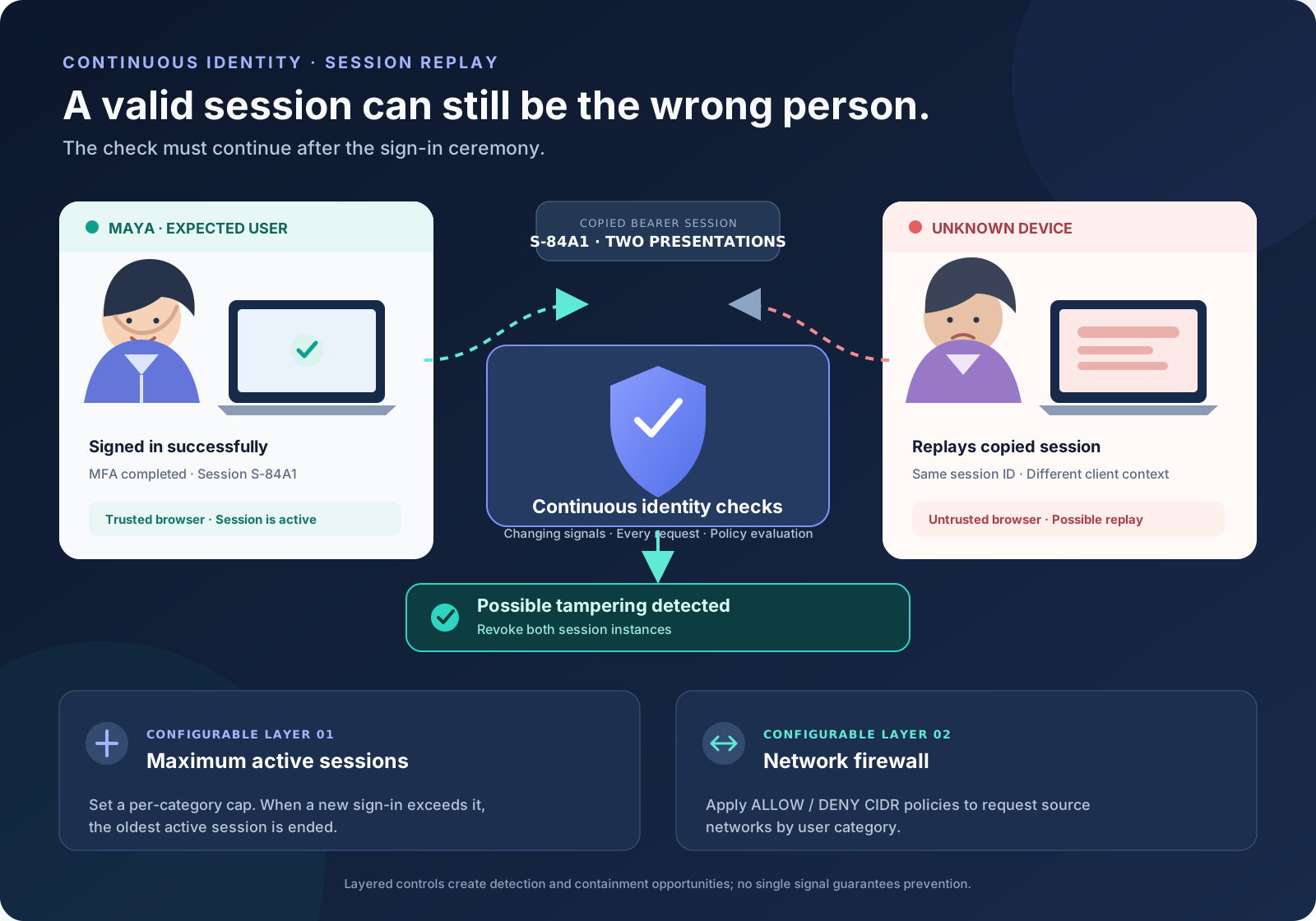
Maya signs in to the company portal, completes multi-factor authentication and gets on with her day. A few minutes later, a malicious browser extension copies her session token. An attacker opens another browser, replays the token and starts making requests. No password guessing is needed. The application may see a valid session even though the person making the next request is not Maya.
What session hijacking looks like
Authentication proves that a credential ceremony succeeded at a particular moment. After that, the application usually relies on a session identifier or token to recognise subsequent requests. If an attacker obtains that bearer material—through malware, a malicious browser extension, cross-site scripting, a compromised endpoint or another exposure—they may be able to replay it and act as the authenticated user.
That is the uncomfortable part: the attacker may not need the password, and may not need to repeat the multi-factor challenge. The stolen session is being presented as proof that authentication already happened. A sign-in page alone cannot continuously establish who is behind every later request.
Continuous identity changes the question from “Did this account authenticate?” to “Does this active session continue to match the identity and security policy we expect?”
What public incidents do—and do not—tell us
Session theft is a documented threat, not a theoretical edge case. In a June 2024 security post, Binance warned that malicious browser plugins can steal sensitive information and hijack sessions. In September 2026, Socket reported a cross-browser extension campaign that targeted crypto traders using Axiom Trade and Padre, stealing session and wallet-related data.
It is important not to merge unrelated incidents into one narrative. Binance’s October 29, 2026 hot-wallet incident was described in its October 30 update as an infrastructure compromise under investigation; Binance said its initial investigation suggested a compromised laptop and that additional breach points had since been identified. That public update did not identify the incident as a confirmed session-token hijack. The scenario in this article is the broader, well-documented threat of a stolen session being replayed—not a claim about the root cause of any one exchange incident.
For the links and dates behind this distinction, see Sources and further reading.
Continuous identity after sign-in
WebFrolic is designed to do more than handle the initial authentication ceremony. Its integrated application evaluates active sessions against the organisation’s security policies. For a suspected hijacked session, the product design combines one default control with two configurable controls. They address different parts of the problem; none should be treated as a guarantee that every form of endpoint or token compromise will be stopped.
Here is how those layers are intended to work together.
1. Default: proprietary session fingerprinting
WebFrolic’s proprietary, patent-pending session fingerprinting is designed to make two concurrent instances of the same session harder to use. Client signals are updated as requests are made and checked against the signals previously observed for that session. The aim is to detect a second presentation of the session that no longer fits its expected client context.
When the mechanism detects possible session tampering, the described response is to revoke both session instances. That is a deliberate containment choice: when two competing presentations share one session identity, the system should not simply guess which browser is the legitimate one and leave the other trusted. The user must authenticate again to establish a fresh session.
Think of this as a moving consistency check, not a one-time device label. The signal set, thresholds and server-side enforcement are what matter; a static fingerprint by itself would be much easier to copy.
2. Configurable: limit the number of active sessions
Session settings let an administrator choose the maximum number of active sessions separately for administrators, employees and other users. For privileged administrator and employee accounts, a maximum of one active session is a sensible starting point where the working pattern permits it.
The behaviour is specific: when a new sign-in would exceed the configured limit, the oldest active session is ended. With a limit of one, a new successful sign-in replaces the previous active session. That can help when the real user signs in again after an attacker has established a session, but it is not the same as detecting every replay immediately. It is a concurrency limit, and it should be configured with the user’s legitimate multi-device needs in mind.
3. Configurable: network firewall
Network controls provide another policy boundary. Administrators can configure ALLOW and DENY rules using IP addresses or CIDR ranges for user categories. A request made with a stolen session from a network outside the permitted range can therefore be rejected by policy, even if the session token itself has not expired.
Network context is useful, but it is not a person identifier. Employees may move between office networks, VPNs, mobile carriers and shared proxies. A changing IP address is not automatically malicious, and a stolen session used through an approved VPN or shared egress may still appear to come from an allowed network. Use explicit ranges, define an exception process and test the rules at the actual enforcement point.
Where these controls have limits
Layering matters because the attack does not always create the same evidence. Consider an attacker who steals a session and replays it while Maya’s original browser is still active. A concurrent-session signal may be available. Now consider a more careful attacker who first removes the original session state from Maya’s browser—or compromises the original endpoint and operates inside its browser context. The server may see only one presentation of the session, so the concurrency signal may not fire.
- Fingerprinting is a signal, not an absolute proof of identity. If an attacker controls the endpoint or browser, they may be able to manipulate parts of the client context. The strength of the control depends on the signals used and how they are validated.
- An active-session cap is not an instant replay detector. It takes effect when a new sign-in would exceed the configured limit. A stolen session that is the only session currently presented may remain usable until another control intervenes or it is revoked.
- IP policy has blind spots. NAT, VPNs, cloud proxies and shared office egress can make different users appear to come from the same address. Do not treat IP reputation or address change as identity proof.
These controls should sit alongside secure cookie attributes, protection against XSS, a strong content security policy, managed browser extensions, endpoint detection, phishing-resistant authentication, short and appropriate session lifetimes, step-up verification for sensitive actions, token revocation and useful audit records. Those are complementary defence-in-depth practices, not claims that one identity product can replace application and endpoint security.
A practical configuration and test plan
For a high-risk administrator or employee population, start with a maximum of one active session if it fits the organisation’s operating model. Set maximum session duration and inactivity limits deliberately. Add network rules for known corporate or integration ranges where those boundaries are stable, and provide a controlled way to update them when networks change.
Then test both the expected and the awkward cases:
- Replay a copied session while the original browser session is still active. Confirm that the expected signal is detected and that the configured revocation behaviour is enforced.
- Repeat the test after the original browser has lost its local session state. Confirm what the fingerprinting layer can and cannot see, and verify the additional controls that are expected to contain the session.
- Sign in again after a session has been established elsewhere. Confirm that the configured maximum active-session count ends the oldest session when the cap is exceeded.
- Replay from an unapproved network and from an allowed VPN or shared egress. Confirm that CIDR rules behave as intended without blocking legitimate users unexpectedly.
- After revocation, test normal page requests, API requests and any refresh path. Check that the old session cannot silently become valid again and that the event is auditable.
Do not stop at the “attacker blocked” screenshot. Verify server-side enforcement, the exact session that was revoked, user recovery and the operational evidence available to responders.
Questions to ask before calling your session controls ready
- Can the system identify a session that is being presented from two distinct client contexts?
- What exactly is revoked when a session mismatch is detected?
- What happens when the legitimate browser no longer presents the original session?
- Does a one-session policy fit administrator and employee workflows?
- Are network allow/deny rules tested with VPNs, proxies and changing office networks?
- Can responders verify revocation across browser, API and token-refresh paths?
Sources and further reading
- Binance — “Beware of Browser Plugins: Protect Your Account from Being Compromised” (13 June 2024). Binance’s own guidance on malicious browser plugins, cookie theft and session hijacking.
- Socket — “Malicious Chrome and Firefox Extensions Steal Crypto Traders’ Session and Wallet Data” (9 September 2026). Research into malicious extensions targeting Axiom Trade and Padre users.
- Binance — “Security Incident Update #2” (30 October 2026). The company’s update on the separate hot-wallet infrastructure incident and its ongoing investigation.