
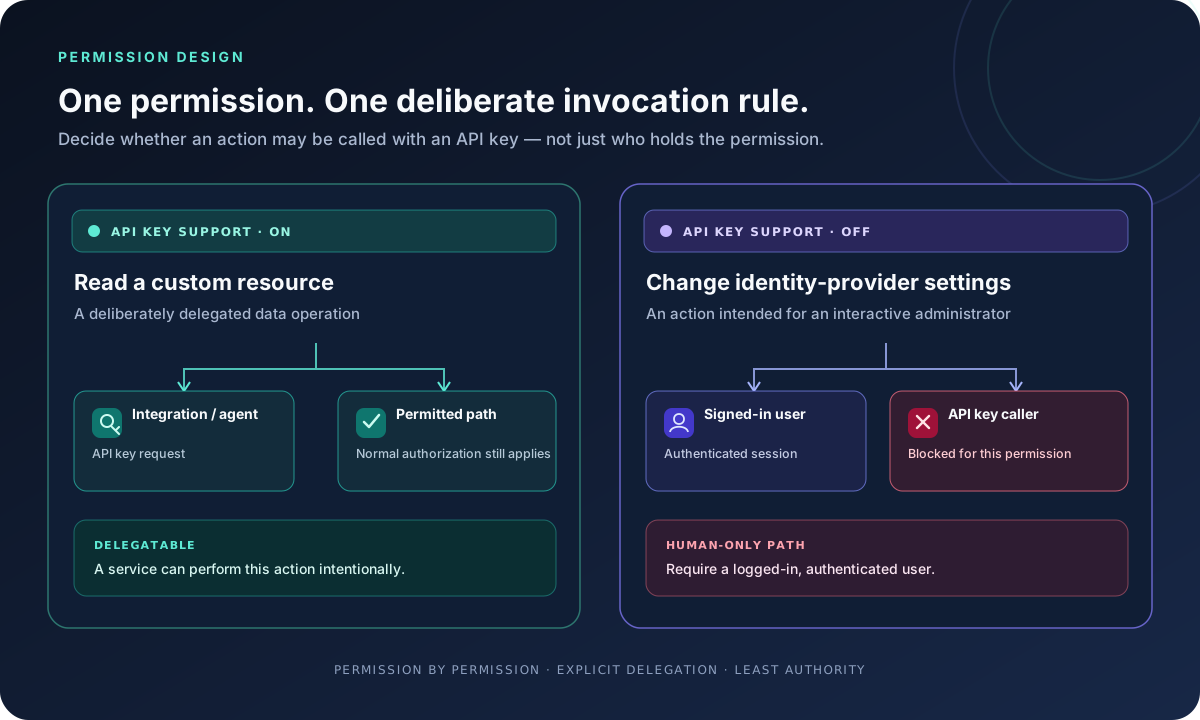
A permission model can be detailed and still delegate too much. Imagine an application where an administrator can configure custom resources, manage identity-provider resources and define separate permissions for each action. If every permission can be invoked through an API key, an integration may be able to call actions that were designed for a person using the application. The important question is not only who has this permission? It is also which kinds of callers should be allowed to invoke it?
A resource is the thing. A permission is the action.
Custom resources let a product represent domain-specific objects that do not fit a fixed catalogue. Identity-provider (IdP) resources can have their own actions too. A permission describes a meaningful operation on a resource: what can be read, created, changed or administered. Different actions can have different risk profiles, even when they belong to the same resource.
That makes a permission a natural place to express whether API-key invocation is supported. One action may be intended for a third-party application or an AI agent to carry out through an API. Another may be intended only for a logged-in administrator working in an authenticated session. The configuration should be able to say so for each permission instead of forcing both actions into the same integration model.
Authorization has two separate questions
Keep the distinction clear:
- Permission: Is this caller authorised for the resource action?
- Invocation method: Is this permission allowed to be called using an API key, or must it be invoked by an authenticated logged-in user?
API-key support adds the second boundary; it does not replace the permission check itself. When support is enabled, a key-based caller may invoke that permission, subject to the platform's normal authorization rules and the authority assigned to that key. When support is disabled, the action remains available through the authenticated user session and cannot be invoked through an API key.
Choose the boundary action by action
The right setting depends on what the action is for. The examples below are design patterns rather than assumptions about any particular endpoint.
| Example action | API-key support | Intent |
|---|---|---|
| Read a custom resource for a scheduled report or partner integration | Enable when deliberately delegated | Let an approved integration perform the job without borrowing a person's interactive session. |
| Synchronise a selected resource as part of an automated workflow | Enable if the workflow needs it | Expose the required operation to automation while keeping the granted authority narrow. |
| Change a sensitive IdP setting intended for an administrator in the console | Disable | Keep the operation tied to an authenticated, logged-in user. |
| Manage a resource that has both read and destructive actions | Decide separately for each permission | Do not make a read operation's integration needs automatically justify API-key access to every change operation. |
Delegation should be explicit, especially for AI agents
Third-party applications and AI agents are useful precisely because they can perform tasks without a person manually operating every step. But the same automation makes it important to decide which actions are suitable for delegation. If an agent needs to read a selected custom resource, that need should not automatically imply permission to alter identity-provider settings or perform unrelated administrative actions.
A per-permission API-key setting creates a more deliberate boundary. Enable it for the actions that are intended to be called by key-based integrations. Keep it disabled for actions that should require a person to be logged in. This allows the application to offer useful integration capabilities without treating every human-facing permission as an API capability.
Turn the setting into a reviewable policy
When adding or reviewing permissions, use a small and repeatable checklist:
Put it into practice
Five questions to ask for every permission
- What resource and action does this permission represent?
- Does a legitimate third-party integration or agent actually need to invoke it?
- If API-key support is enabled, are key authority and normal permission checks still applied?
- If API-key support is disabled, have you verified that a key cannot invoke the action while an authenticated user session can?
- Can the reason for enabling or disabling API-key support be explained during an access review?
Finally, treat API keys as credentials that need ownership, careful distribution, review and revocation. Do not put a secret key in browser-side code or assume that enabling an integration path means every action should be available to it. The useful default is deliberate delegation: expose only the operations that need to be automated, and leave the rest behind the user-session boundary.